Online Safety at Faldingworth School
Children at Faldingworth School use the Internet on a regular basis as part of their learning. In school, we have regular 'e-safety' activities and assemblies to remind children of the importance of keeping themselves safe online.
At home, sometimes children can be given unsupervised access to the Internet. This, potentially, allows them to access all kinds of society (both good and bad) and bring them virtually into their homes.
Here are some tips and useful links to help you to keep your children safe online:
Please support the school by reaffirming the message that the Internet is a dangerous place for a child and that they have to take care. If possible adjust the security on your computer to block sites that make your child vulnerable.

Online Safety information for Parents/Carers
We often send posters containing various information on Internet / App safety.
Please use the links below to view these:

|
2BeSafe Parent Information – Self Image and Identity | [pdf 136KB] |

|
|
|
2BeSafe Parent Information – Privacy and Security | [pdf 136KB] |
|
|
|
2BeSafe Parent Information – Online Reputation | [pdf 136KB] |
|
|
|
2BeSafe Parent Information - Online Relationships | [pdf 144KB] |
|
|
|
2BeSafe Parent Information - Online Bullying | [pdf 136KB] |
|
|
|
2BeSafe Parent Information - Managing Online Information | [pdf 148KB] |
|
|
|
2BeSafe Parent Information - Health, Wellbeing and Lifestyle | [pdf 156KB] |
|
|
|
2BeSafe Parent Information – Copyright and Ownership | [pdf 135KB] |
|
|
|
Age inappropriate content | [pdf 2MB] |
|
|
|
AI Virtual Friends | [pdf 2MB] |
|
|
|
Build up resiliance | [pdf 2MB] |
|
|
|
Choose respect | [pdf 2MB] |
|
|
|
Fortnite | [pdf 3MB] |
|
|
|
making-friends-online | [pdf 2MB] |
|
|
|
Managing Device Anxiety & Stress | [pdf 2MB] |
|
|
|
Mental Health apps | [pdf 2MB] |
|
|
|
roblox-2025 | [pdf 1MB] |
|
|
|
Smartwatches | [pdf 3MB] |
|
|
|
Spending and Saving | [pdf 2MB] |
|
|
|
streamers | [pdf 2MB] |
|
|
|
Telegram | [pdf 3MB] |
|
Online safety newsletters
We often send online-safety newsletters to Parents. Please see below to view these:
|
|
Online safety newsletter - Dec 2025 | [pdf 147KB] |
|
|
|
Online safety newsletter - Dec 2024 | [pdf 103KB] |
|

|
Online safety newsletter - July 2024 | [docx 2MB] |
|
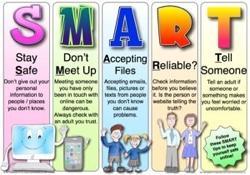
Tips for children and parents to stay SMART online
Explore e-safety sites - There are lots of links to useful e-safety sites for children in our Children's Zone. They are great fun to explore, so why not browse through them with your children?
Facebook / Snapchat / Instagram / TikTok - Many of these sites have a minimum age limit of 13, so our pupils should NOT be using them. They do not offer the same levels of protection as child friendly social networking sites.
Keep your computer in a shared area - Talk to your child about what they are doing online and, if possible, set up your computer in a shared area at home so that you can all share in the wonderful sites that are available online.
A good site for the child to learn the skills they need to use the Internet Safety is the Think you Know site set up by Child Exploitation and Online Protection Centre.
If you have any further questions please do not hesitate to contact me.
K Grummell
Headteacher